

QuickSight
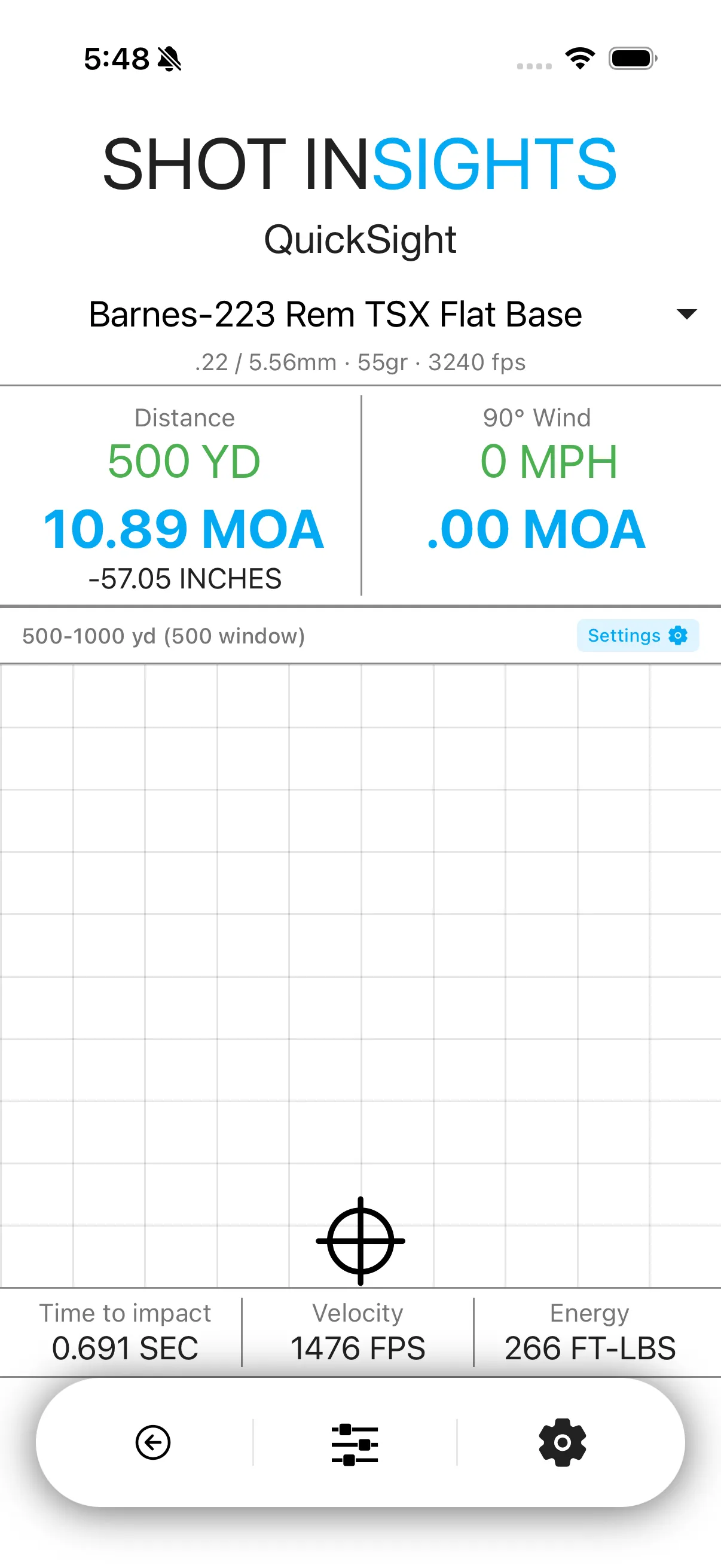
QuickSight is the fastest way to get a firing solution for one target. It shows your elevation, windage, time of flight, velocity, and energy in a live view that updates as you adjust distance and wind.
Use QuickSight
Section titled “Use QuickSight”- Open QuickSight from the home screen.
- Confirm that the correct ballistic profile is active.
- Drag or swipe to the distance you want.
- Set your wind in the environment controls, or connect a supported weather source from Sensors & Integrations.
- Read the elevation and wind hold shown on screen.
What QuickSight is best at
Section titled “What QuickSight is best at”- Fast single-target shooting
- Spotting how wind changes your hold
- Checking time of flight, retained velocity, and energy before a shot
- Making quick range changes without building a full target list
- If your hold looks off, double-check your active profile, zero, and weather.
- For multiple targets, switch to QuickShot so each target keeps its own distance.
- If you want voice help without touching the screen, use Voice DOPE.
Help improve these docs
With your permission, we use Google Analytics cookies to understand which guides are useful. Analytics is optional. You can change your choice in Analytics preferences at any time. Privacy policy