

Environment and Atmosphere
Ballistic solutions depend on current conditions, not just your rifle and load. Temperature, pressure, humidity, density altitude, and wind all affect how the bullet flies.
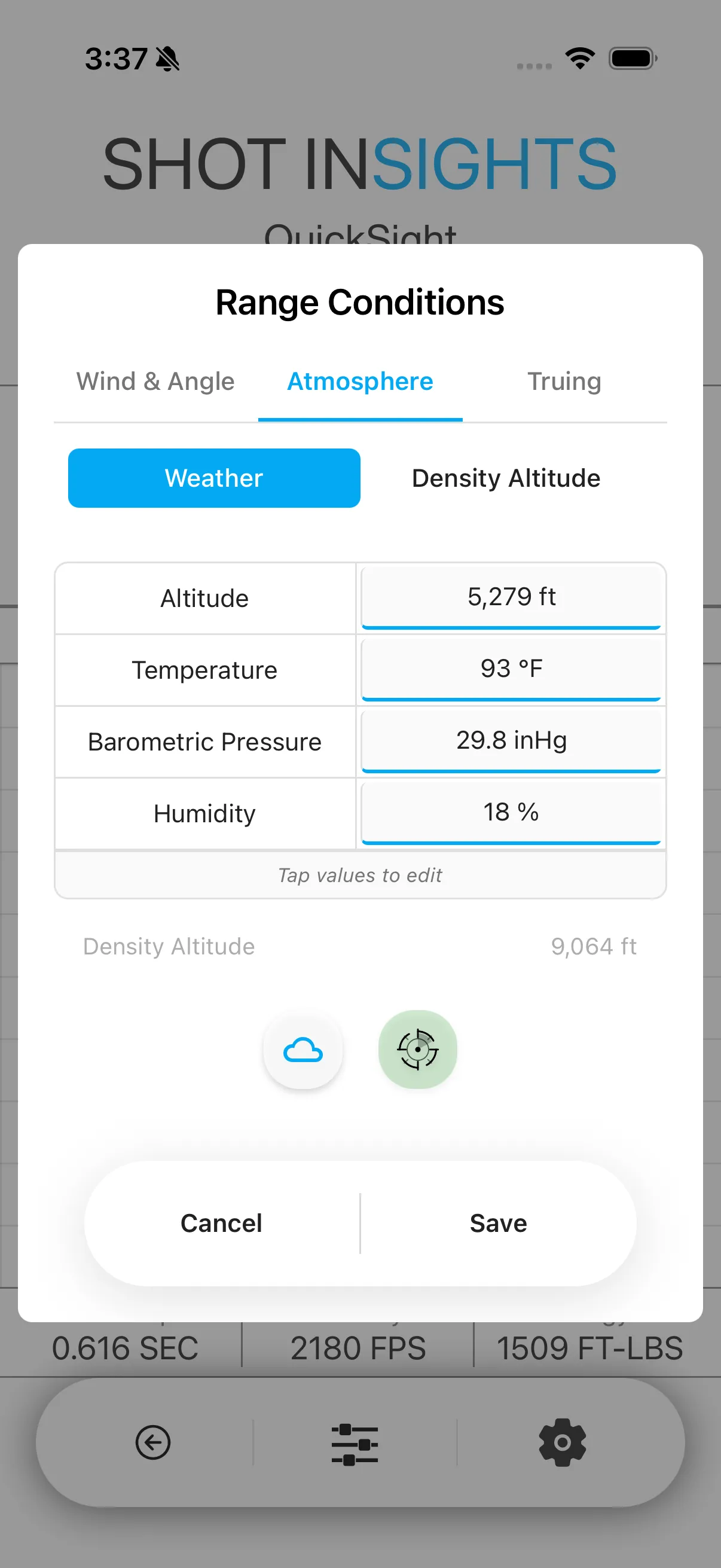
Set the environment manually
Section titled “Set the environment manually”- Open your ballistic profile.
- Open the environment or atmosphere controls.
- Enter the current Temperature, Pressure, and Humidity.
- Add wind speed and direction if you want a more complete solution.
- Save the changes and review the updated holds.
Use connected weather data
Section titled “Use connected weather data”If you use a supported weather sensor, Shot Insights can bring in live conditions for you. See Integrations for the supported options and setup steps.
What density altitude means
Section titled “What density altitude means”Density altitude describes how thin or thick the air currently is, based on temperature, pressure, and elevation — it affects how far a bullet drops and how it behaves at distance. Higher density altitude usually means thinner air, which can shift your solution.
When to update conditions
Section titled “When to update conditions”- When the temperature changes meaningfully
- When you move to a different elevation
- When the pressure changes
- When wind conditions are changing
- Refresh conditions before a long stage or a long-range shot.
- Use live sensor data when conditions are moving quickly.
- Review the terms in the Glossary if you want a refresher on DA, hold, or wind inputs.
Help improve these docs
With your permission, we use Google Analytics cookies to understand which guides are useful. Analytics is optional. You can change your choice in Analytics preferences at any time. Privacy policy